
Pictures that give away your location
A photo of your back porch. A check-in at your gym. A sunset shot from the front yard. Each one narrows the field for someone trying to find your house.
Photos give away location two ways. Direct EXIF metadata — the metadata your phone secretly stamps onto every photo, usually GPS coordinates and timestamp — and visual cues like cross-streets, identifiable buildings, and landscape that triangulates. Both matter. Most posters only think about one.
What an adversary sees
A trained analyst pulls more out of a single photo than most people would believe. (OSINT is the work of digging up what's public about a person — searching, cross-referencing, putting the pieces together. Photos are some of the richest input there is.)
- EXIF metadata. GPS coordinates, exact timestamp, camera model, sometimes the phone owner's name. Major social platforms strip this on upload. Direct shares (text, email, Discord, AirDrop) usually don't.
- Sun angle and shadows. Combined with timestamp, narrows latitude and rough longitude.
- License plates in the background. Searchable in some states; always linkable to a vehicle and an address.
- Mailbox numbers, house numbers, street signs. One frame, one address.
- Recognizable landmarks. A water tower, a stadium, a church steeple — narrows to a city block.
- Yard furniture, fence pattern, window trim. When you post the inside of the house later, the matching elements confirm it's the same property.
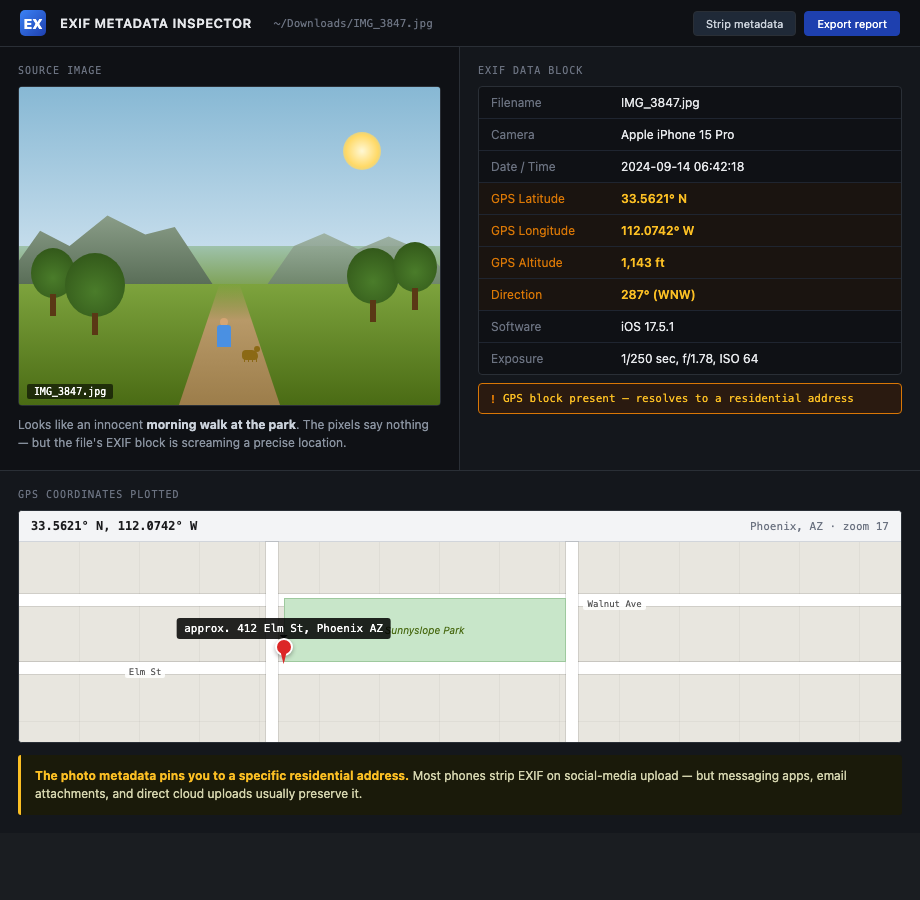
The adversary doesn't need one photo with everything. They stitch a dozen photos into one address.
How to do this on yourself
Run two passes on your own posts: metadata and visual.
Metadata pass. Pick ten recent photos you've shared by direct message, AirDrop, or email — not platform-uploaded. Open each in:
- exiftool (command line) —
exiftool photo.jpgdumps everything. - Jeffrey's Image Metadata Viewer — web-based, drag and drop.
- On iPhone, Photos app: tap the photo, swipe up, scroll to the map.
If you see GPS coordinates, the photo gave away the location.
Visual pass. Pull up your last twenty public photos. For each, ask:
- Can I see a street sign, house number, or business sign?
- Can I identify the neighborhood from the skyline, terrain, or landmark?
- Is there a license plate in the frame, mine or anyone else's?
- Does the yard, porch, or garage match anything I've posted from inside?
If yes to any, the photo narrows your address.
What to do about what you find
Going forward and looking back are different jobs.
Going forward:
- Strip EXIF before sharing photos by DM, email, or AirDrop. iPhone: Share > Options > Location off.
- Turn off location tagging in your camera app entirely if you can live without it.
- Don't post real-time. Delay anything location-revealing by at least 24 hours. Better, post after you've left.
- Crop tightly. Address numbers, plates, and street signs out of frame.
Looking back:
- Audit every public account for geo-tagged posts and remove them.
- Pull anything that shows the front of your house, your driveway, or recognizable yard features.
- Talk to family members about photos they've posted of your house. See family member OSINT leaks.
If a specific photo is already being used to harass or locate you, jump to the doxxing playbook or active swatting playbook.
What we handle automatically
Visual OSINT defense is on you. We can't crop your old vacation photos.
What we handle is the address-in-a-database layer that visual OSINT eventually needs. An adversary who narrows your house to "somewhere on the 400 block of Elm" still needs to confirm the exact address. They check TruePeopleSearch, Spokeo, and USPhoneBook. If your name returns nothing, the chain breaks.
Run a free scan to see what brokers currently confirm. We remove them and keep them removed. Visual OSINT becomes a guess instead of a confirmation.
Most OSINT chains end at a broker page that ties your name to a home address. Run a free scan to see what's currently exposed.