
Dating app OSINT
A profile photo, a first name, a neighborhood. Combined with reverse image search and a broker page, that's a real name and a home address inside an hour.
Dating apps publish more identifying signal than people realize. Active and retired first responders who use the apps face a particular problem — the same things that make you trustworthy on a profile (clean-cut photo, real first name, "I work nights") are exactly what someone digging into you needs. OSINT is the work of digging up what's public about a person — and dating profiles hand over a head start.
What an adversary sees
Open any dating profile. Pull what's there:
- A clear face photo. Runnable through PimEyes, FaceCheck.ID, or Google Lens.
- A first name. Sometimes real, sometimes not.
- An age and a neighborhood. "32, lives in Midtown."
- Cues about work. A uniform shirt in the background. A patrol car door. A station group photo. A "I work shift work" line.
- Sometimes a height, a job description, the gym you go to.
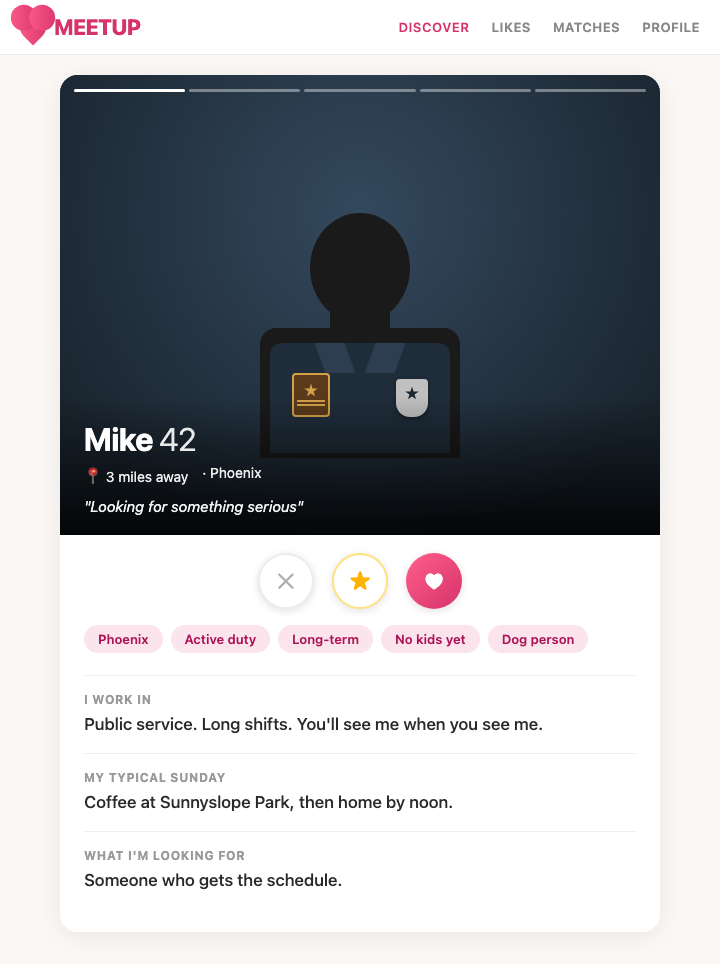
The chain runs short. Face photo into PimEyes returns your LinkedIn or Facebook. That gives a last name. Last name plus neighborhood plugged into TruePeopleSearch or Spokeo returns your home address. Total elapsed time: under an hour.
How to do this on yourself
Run your own profile against the tools an adversary would use.
- Save each photo from your dating profile. Run them through PimEyes and FaceCheck.ID. Note what comes back — LinkedIn, old Facebook, a department news photo, a 5K finish-line shot.
- Run them through Google Lens too. It's free and it pulls different matches.
- Search your first name plus neighborhood plus age range against Whitepages, TruePeopleSearch, and Spokeo. See if the combination narrows to you.
- Reverse-image any background object — a building, a bar, a bridge. Geo-locatable scenes give your area away.
If your face matches return your real name and any broker page returns your address from a first-name + neighborhood query, the chain is live.
What to do about what you find
Break the chain at every link.
- Photos no other account uses. Take fresh ones for the dating app. Never recycle a LinkedIn headshot, a Facebook profile pic, or anything tagged on Instagram. Reverse image search only works if the photo exists elsewhere.
- No work context. No uniform shirts. No badges, patches, or duty belts in frame. No station, ambulance bay, or apparatus floor backgrounds. No "I work shift work" or "I'm a first responder" in the bio.
- No specific neighborhood. "Lives in the city" beats "lives in Midtown." Vague is your friend.
- App-only first name. Use a middle name, a nickname no one else uses, or just an initial.
- Audit background details. A street sign, a bar logo, a numbered jersey — any of it geo-locates you.
Your home is your home. The dating profile shouldn't lead anywhere near it.
What we handle automatically
The broker layer is what completes the chain. Without TruePeopleSearch, Spokeo, and Whitepages returning a home address from a name + neighborhood query, the dating-app reconnaissance dead-ends at "I know your real name."
We file continuous opt-outs across the broker network so that step doesn't resolve. A free scan shows which brokers currently return your address from that kind of query.
The dating-app side — the photos, the bio, the privacy settings — is on you. The hardening above is the playbook. Combine the two and the chain stops being a chain.
Most OSINT chains end at a broker page that ties your name to a home address. Run a free scan to see what's currently exposed.